Guide for Data Submission to SPDF
This document is intended to walk data providers (often mission teams) through the process of getting science data and documents into the SPDF archive, in particular from preparing CDF files (certain netCDF4 acceptable) to public access on CDAWeb.
🔗 Detailed requirements for new data delivery to SPDF including the dealing with netCDF data.
🔗 Conventions of file naming (including data version) and directory hierarchy.
🔗 Full ISTP Metadata Guidelines: https://github.com/IHDE-Alliance/ISTP_metadata
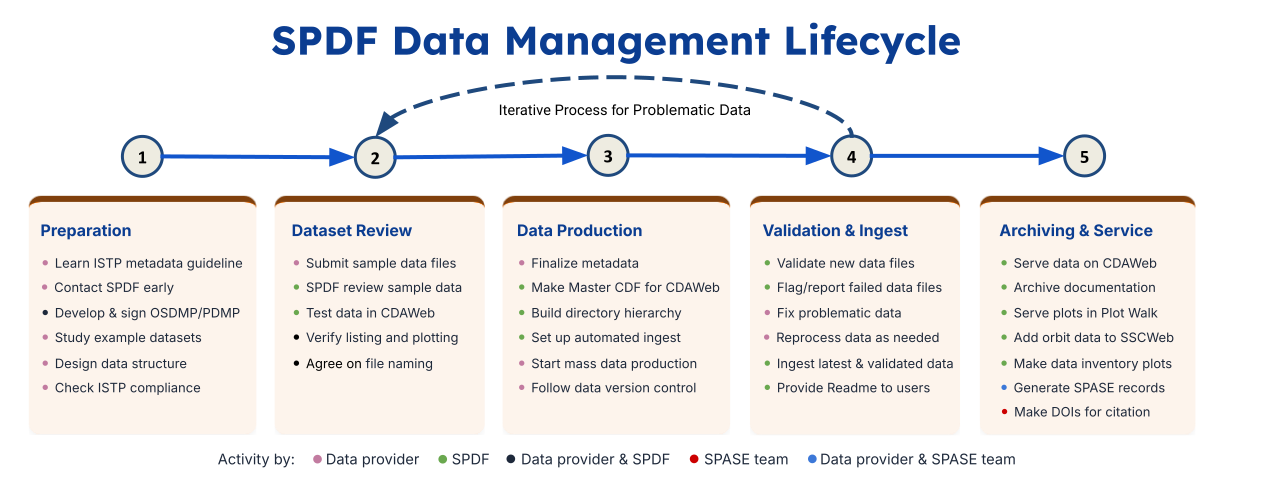
🗂️ Before You Start
Talk to SPDF Early. The SPDF team can help with dataset and metadata structures, variable layout, conventions for file naming and directory hierarchy at any stage of the development phase. Reach out early to SPDF leads, designated data curation scientists (if known), or email NASA-SPDF-Support@nasa.gov. SPDF needs to sign the Project Data Management Plan (PDMP) or Open Science and Data Management Plan (OSDMP) for heliophysics missions before Phase E.
Study What Already Exists. Find a mission with similar instruments or data products and use their files as a starting point. Examples recommended by SPDF are forthcoming.
📘 Master CDFs
A Master CDF only contains the metadata within a dataset and no actual science data. SPDF generates a single master CDF per dataset from your initial submission and continuously updates it as the dataset matures. It serves as the rubric that all future submissions are validated against.
📂 Master CDFs — Metadata-only CDF files used for validation
📂 Skeleton Tables of the Master CDFs — CDF structure templates (global and variable attributes) in ASCII text format
⚠️ Incoming files that do not match the Master CDF will be rejected (due to addition/removal of variables, changes of variable names, dimension sizes and other attributes, etc.). SPDF requires a consistent dataset definition over the life of the mission. If a change is unavoidable, coordinate with SPDF and plan to reprocess the entire dataset. Design your metadata carefully up front with archiving in mind, such as assigning enough dimension size and setting record-varying variables.
📡 Data Ingestion — Step by Step
Phase 1 · Preparation & Compliance Check
① Metadata Compliance Check — Validate your CDF (preferred) or netCDF files against ISTP Metadata Guidelines using the ISTP Metadata Editor (or equivalent) before contacting SPDF. Please note that clearance from this check does not equate to being fully ISTP compliant; the Editor is a tool that validates the structure of the metadata, not the accuracy of its content. Errors from the compliance check must be fixed, while warnings are generally acceptable but should be minimized. Please, ask SPDF about any issues or concerns.
Phase 2 · Submit & Review
② Send Sample Files — Contact your assigned SPDF curation scientist with sample data files covering all relevant data products. SPDF can review preliminary or “test” files at this stage, as the primary focus of the review is the metadata structure and compliance rather than the final science data. Per NASA’s Scientific Information Policy (SPD-41a), data is expected to be delivered to the archive as soon as possible, typically within six months of collection or no later than the publication of the associated peer-reviewed article.
③ SPDF Review — Curation scientists review the metadata for structure, compliance, and content, then validates the data on the CDAWeb Test Page for inspection.
④ Joint Review (if needed) — For complex datasets (e.g., spectrograms, waveforms, multi-dimensional arrays), the curation scientist will share the test page with the data provider to confirm the plots and data listing look correct before deployment to the public. Curation scientists will provide specific feedback based on this review, and the process is typically iterative, requiring refinements to ensure that all data products are correctly represented and fully accessible.
Phase 3 · Data Production
⑤ Approval & Mass Production — Once both data providers and SPDF agree on the filenames and metadata of your dataset, mass production of the data may commence and SPDF will finalize the Master CDFs.
⑥ Automated Ingestion Setup — Provide a list of datasets and source locations (mission portal, HTTPS/FTPS server, API). SPDF can configure auto-ingest to pull updated data files typically on a daily basis, or your team can push the data to an SPDF-designated ingest area. For a small mission/project, this could be a one-time-only submission.
Phase 4 · Validation & Archiving
⑦ Automated Metadata Validation — Every incoming file is validated against its Master CDF. No action needed unless something fails.
⚠️Flagged File Resolution — If a file fails the validation, it will be flagged, and the curation scientist will contact your team for more information or necessary fixes. Common causes: variable mismatches, dimension size changes, missing attributes.
⑧ Archiving — Files that pass through the validation are added to SPDF archive. SPDF reserves the right to change filenames or directory structures to enhance the usability following SPDF file-naming conventions.
📦 SPDF only archives the latest version of each data file. Reprocessed files replace previous versions. Our general approach is that reproducing science results does not require the exact data and science claims should be reproducible with improved calibrations in newer data. The small added value in replicating the exact results is not worth the storage or complexity given the current limited resources. Data providers could save old versions of data on the mission side for user inquiry.
⚡ Intermittent data files (e.g., burst-mode products) often use high-precision timestamps in their filenames. However, when reprocessing changes the exact start or stop times, SPDF ingestion can interpret those files as entirely new rather than updated versions. To avoid this, filenames should use only the minimum time resolution required—using date-only naming for daily files—to support consistent versioning and prevent duplication.
Phase 5 · Documentation & Plots
⑨ Documentation — Data providers are responsible for generating and maintaining the following documentation. While SPDF curation scientists assist with integration, the provider must ensure the content is accurate and up to date. SPDF will archive a permanent copy of these files and, where applicable, link to them directly from CDAWeb.
- 00readme.txt: A quick-reference file including an acronym list for instrument names. This is done by SPDF curation scientists with the assistance from your team. See one example in the appendix of data delivery requirement.
- PDMP/OSDMP: Project Data Management Plan or Open Science and Data Management Plan.
- CMAD: Calibration and Measurement Algorithms Document.
- User Guide: A comprehensive guide on how to use and interpret the data products.
- Mission Website: Static webpages in Phase E of missions for final archiving.
- Any other relevant documentation (e.g., redacted senior review proposals or specialized technical notes)
⑩ Pre-generated Plots (optional) — Quick-look and summary plots can be served through SPDF’s Plot Walk.
🌐 Making Data Public
When data, metadata, and services on the CDAWeb Test Page are acceptable to all parties, please request that SPDF make the dataset public on the operational server.
⚠️ Files become public via spdf.gsfc.nasa.gov/pub and are available at CDAWeb as soon as auto-ingest begins. If your mission requires an embargo or restricted access period, this must be arranged with SPDF before auto-ingestion starts.
Once public, your mission also appears in Data Inventory Plots and Mission Data Statistics.
🏷️ SPASE Records & DOIs
Handled by the Space Physics Archive Search and Extract (SPASE) team (i.e., not SPDF), although the SPASE and SPDF groups coordinate closely.
- SPASE records are generated from your CDF or netCDF metadata for each public science dataset, and DOIs are minted for them so they are citable.
- SPASE records and DOIs can also be made to key plots and documents — please submit a request to the SPASE team (spase-support@groups.io).
📬 Questions?
Reach out to SPDF data contacts. The earlier you engage, the smoother the process goes!
Last updated: 2026-06-11


